
Product Goal(s)
To capture and display the memories associated with a location. Practically, a means for those to log personal moments associated with specific geolocations by means of photos and descriptions. These moments are then presented in aesthetically pleasing way to reflect upon.
Keywords
Visualizing Memories
Personalized Locative Narrative
Reflective Organization
Moment Diary
Description
A mobile app was decided as the software platform. People often experience special moments that are associated with a location. It was decided to provide a means to converge location and personal memories to capture the essence of a moment. By using geo location one can save a memory to a specific spot on a map. These memories can then be enjoyed and reflected upon at any time. Photos and description entries were chosen as a means of record.
Use Cases (vox pop)
I am so annoyed. I know that I shared a special day with my friends here but I cannot remember what year it was for the life of me!
I share so many moments went my friends at this place. I would love a way to take all my captured memories here and have them nicely organized.
It would be cool to view a map that displays all the various moments I have had around the globe.
I always pay attention to random locations and often “I wonder if anything out of the ordinary happened there or if the location holds importance to someone” for whatever reason”. This train of thought prompted me to be able to log my special moments to random places.
It would be cool to reflect on past experiences I shared at a place with friends while we go through old memories on our phones.
Features / Requirements
1. Log a story to a specific location.
2. Upload photos instantly associated with current GPS.
3. View a summary of all my memories that are currently in close proximity, viewing them in an aesthetically pleasing way.
4. Search specific locations in the world to see if I stored any memories there.
5. Iterate through all my stored memories at ease due to organization implementation.
Epics
- As a tourist, I want to be able to store a memory to a location so that I can view it later.
- As a city local, I want to be able to view all my stored memories so that I can select one.
- As a tourist, I would like to select one memory so that I can see its details.
User Stories
User Story 1
Title
As a tourist who loves to capture moments, I would look to log a record (via text entry) of my current activity attached to my geo location so that I can reflect on it at a later date.
Description
There are two ways to record a memory; through descriptive text and photo attachment. Memory creations will automatically associate the current geo location to the memory being recorded. Memories require a Title, Description and adding a photo is optional. Users will be notified if the upload was successful.
Acceptance Criteria
- Textedit areas to allow user to enter the memory details and title
- A button to submit entered details.
- Method to indicate task completion
- Appropriate screen navigation is present
User Story 2
Title
As a city local, I would like to view a map of my surrounding areas to see if I have an any previous memories stored near by.
Description
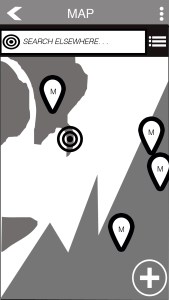
The map can be accessed from the main menu. Once selected, it will automatically display the user’s current surroundings and memory markers that had been previously stored
Acceptance Criteria
- Appropriate screen area to effectively show markers on the msp
- Markers on the screen denote a memory
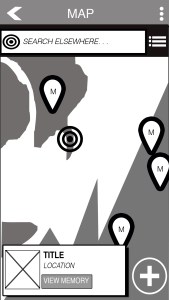
- Users can select various markers to view further detail.
- Appropriate screen navigation is present
User Story 3
Title
As a city local, I want to be able to see all my saved memories in a list form so that I can scroll through them in an organized fashion
Description
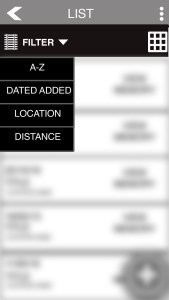
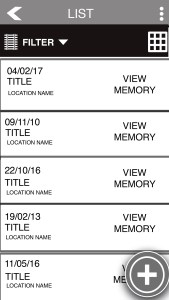
A user can view their memories in two forms: via the map or via a list. In the list. How the list is organized is based the dropdown selection. There are three ways to organize: 1) Alphabetically 2) By distance from current location 3) Date added.
Acceptance Criteria
- A button to flip between map and list
- A drop down menu that displays organization
- Appropriate screen navigation is present
User Story 4
Title
As a city local, I want to upload a picture to accompany my description and attach it to my current location as a memory.
Description
Similar to use case 1, a user has the choice to add a photo with their memory submission. There is a choice between uploading a picture live from the camera or choosing a photo from the camera roll.
Acceptance Criteria
- Button to view the camera live
- Button to view pictures from camera roll
- Adequate area to display the chosen picture
- Submission button similar to use case 1
- Appropriate screen navigation is present
User Story 5
Title
As a novice smartphone user, I want more information about the application so that I am aware what it does and how it works.
Description
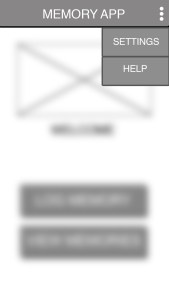
By accessing the action bar, the user is capable of seeing extra features such as Help. The help screen provides the user with the details required to understand the functionality of the app. This can be accessed from any screen.
Acceptance Criteria
- Action Bar menu on every screen.
- Help button in the menu
- Appropriate screen navigation is present
User Story 6
Title
As a tourist, I would like to view a specific memory I have logged so that I can view more details about it.
Description
Whether the user is viewing the map or the list view, they will have the option to view the memory in more detail. Once selected they will be presented with the Title, Description and Photo associated with the memory.
Acceptance Criteria
- Adequate space displaying the attached photo
- Title of memory
- A description of the memory
- Appropriate screen navigation is present
User Story 7
Title
As a tourist, I want to view my memories on the map view but be able to see more than what is nearby so I can see my memories around the world.
Description
The user has the capability of viewing their memories from all around the world. If their memories are spread all over the globe it is difficult to accurately show all the markers effectively, The user can use a search bar to navigate to specific GPS locations i.e. search other cities they know they have memories stored in.
Acceptance Criteria
- A search bar
- Appropriate screen navigation is present
Rapid Prototyping
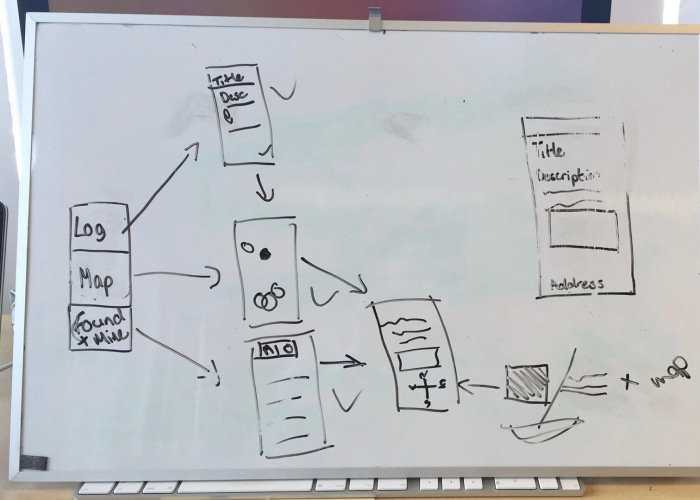
Below are the wireframes created for this project. They were created using Photoshop.







Click Through Prototype
The Click Through Prototype was created using InVision. Download it HERE and open the html file to interact with the prototype in your browser.
 Stuart Creates